The case left your practice on Monday. It’s Thursday. Where is it?
One shared desk where your practice and lab see the same case — submit it with the teeth marked and scans attached, agree the quote on the record, and watch it through to delivery. No phone calls.
Send a case in minutes — and never call to chase it again. Receive complete, structured cases — and record every acceptance.
[email protected] · We usually reply within one business day.
Runs in the browser · No install · No setup fee · No long-term lock-in
Example case ZD-2026-0481 — live status
- CAD design
- Milling
- Finishing
- Quality control
- Shipping
- Delivered
What you can rely on
- 6 production stages tracked
- STL, scans & photos accepted
- Append-only acceptance audit trail
- EU data residency
- FDI / ISO 3950 notation
The cost you’re already paying
Coordinating cases by phone and email isn’t free — it just hides the bill
Every case spread across calls, texts and sticky notes costs you time you can’t bill and trust you can’t rebuild. Here’s where it leaks.
Today — one case, five places
With ZirkoDesk — one shared rail
The spec is somewhere in a thread
Details live in email, SMS and handwritten notes. When something changes, nobody is sure which version is current — and the lab works from the wrong one.
The price was “what we said on the phone”
Quotes get agreed verbally, then disputed weeks later. With nothing recorded, “what was agreed” comes down to who remembers it better.
So you pick up the phone
The only way to know what stage a case is in is to call and hope someone at the lab can stop and check. Multiply that by every open case, every week.
See it, don’t phone for it
You shouldn’t have to call the lab to find out where your case is
Watch it move — CAD design, milling, finishing, quality control, shipping — the moment the lab does the work. When it ships, the invoice and job card are already attached.
- CAD design
- Milling
- Finishing
- Quality control
- Shipping
- Delivered
- 01
CAD design
The lab designs the restoration
- 02
Milling
The unit is produced
- 03
Finishing
Shaped and polished
- 04
Quality control
Checked before it leaves
- 05
Shipping
On its way to you
- 06
Delivered
Case closed, paperwork attached
The workflow
One shared workflow, four steps
The same case, one timeline — the practice submits and tracks, the lab quotes and produces. No re-entry, no second app.
- 01
Submit the case online
The practice creates an order, marks teeth on an FDI chart and attaches scans or STL files.
- 02
Quote and accept terms
The lab prices the work; the practice reviews and accepts the quote and terms — on the record.
- 03
Track production
Follow each stage — CAD design, milling, finishing, quality control — as it happens.
- 04
Delivery and invoice
On shipping, the invoice and job card are generated automatically. No paperwork chase.
Shown, not told
This is what you’re working with
Not adjectives — the real surfaces. If you run a practice or a lab, you’ll recognize your own day on screen.
Try it — click a tooth to select it.
Mark the exact tooth, not “the one at the back”
Submit on an FDI chart in ISO 3950 notation, with scans, photos and STL files attached. No more “which unit did you mean?” phone call.
Agreed before work starts, on the record
The lab sends a quote with line items and a total. The practice accepts the quote and terms in one step — and that acceptance is recorded with who and when.
The job card and invoice write themselves
At shipping, the job card (karta zlecenia) and invoice (faktura) are generated automatically, ready to download as PDF. No re-typing, no chasing.
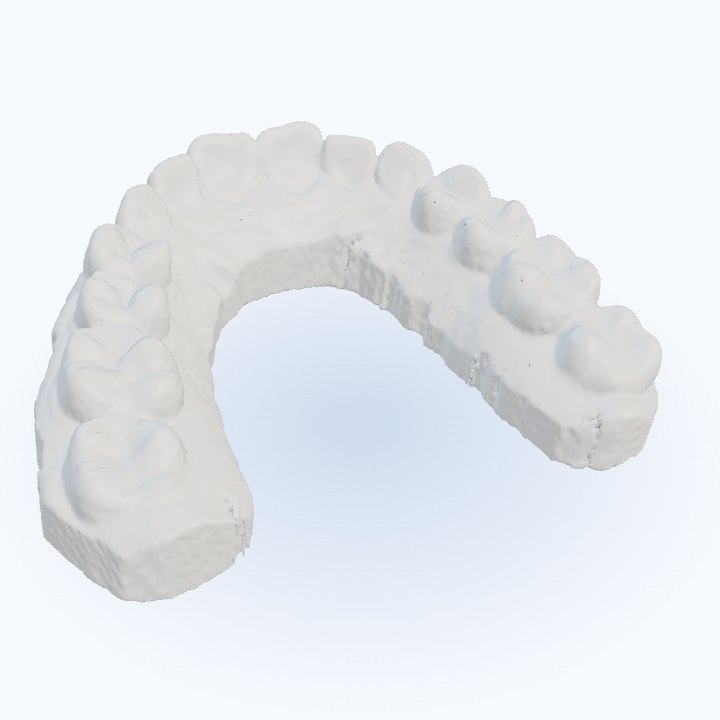
Upper-arch scan — STL files spin right in the browser
Open the scan, not just the file name
STL scans and CAD designs attached to a case open right in the browser — rotate the model and see exactly what was sent, before any work starts. No CAD software on your side.
Compatibility
Works with the files you already export
No new formats to learn. Send what your scanner and camera already produce — and get standard documents back.
You send
- STL files
- Intraoral scans
- Photos
You get back
- Job card (PDF)
- Invoice (PDF)
Teeth are marked in the standard FDI / ISO 3950 notation.
Two views, one case
Built for both sides of the case
Same case, two views. Tell us which side you’re on and the page follows you.
For dental practices
From a single-chair practice to a multi-chair clinic.
- Send a case in minutes, not phone calls
- See the quote and accept terms before any work starts
- Know exactly where every case stands, without calling
- You stay the data controller for your patients’ details
For prosthetics labs
From a small lab to a high-throughput operation.
- Receive complete, structured cases the first time
- Record client acceptance so pricing isn’t disputed later
- Manage every production stage and shipping on one board
- Generate clean job cards and invoices automatically
One case id. Two views. No re-entry.
“We manage fine already”
You manage fine — until a spec changes or a quote is disputed, and nobody can prove what was agreed
Compare what today’s tools give you with what one shared record does.
| Email + spreadsheet today | With ZirkoDesk | |
|---|---|---|
| Single current version of every case | Not available | Available |
| Documented quote & terms acceptance | Not available | Available |
| Live production status both sides see | Not available | Available |
| Invoice & job card generated automatically | Not available | Available |
| Files stored privately, shared by expiring link | Not available | Available |
What “on the record” actually means
Every case keeps a timestamped, append-only history. Acceptance isn’t a feeling — it’s an event.
- Order submitted 09:14
- Quote sent 11:02
- Terms accepted by practice 11:40
- Production started
- CAD design
- Milling
- Quality control
- Shipped + invoice
Security & data protection
Patient data handled in accordance with the law
Patient data is among the most sensitive information your practice processes. Its protection is treated as a foundational requirement of the platform, addressed by design and in accordance with EU data-protection law.
Practice = Controller
Lab = Processor
only to complete the case
Your practice acts as the data controller; the laboratory acts as a processor and handles patient data solely for the purpose of completing the case. Patient data is never exposed in laboratory-side analytics or exports.
Scans and STL files are stored privately and made available exclusively through links that expire automatically, rather than through permanent public addresses.
Processing is carried out in accordance with the principles established by EU data-protection law — lawfulness, purpose limitation, data minimisation, and protection by design and by default — ensuring that patient data is handled appropriately at every stage.
In operational terms, connections are encrypted in transit, data is encrypted at rest and hosted within the European Union, access is restricted according to each user’s role, and every change is recorded in an append-only audit history. Information security forms an integral part of the platform’s architecture.
A Data Processing Agreement (DPA) is available on request.
What we don’t do
- We do not place patient data in laboratory-side analytics or exports.
- We do not sell or share your data for marketing purposes.
- We do not impose vendor lock-in: invoices and job cards export to PDF, and your order data remains available for export.
Questions, answered straight
Answers about data safety, setup and how cases flow through ZirkoDesk.
We already manage cases with email, phone and a spreadsheet — why change?
Until a spec changes or a quote is disputed and nobody can prove what was agreed. ZirkoDesk keeps one current version of every case and records the moment the practice accepts the quote and terms — so “fine” stops depending on memory and goodwill.
Is our patients’ data safe and RODO-compliant?
Patient details belong to the practice as data controller; the lab processes them only to complete the case, and never sees them in lab-side analytics. Files are stored privately and shared via short-lived secure links. EU data handling, no marketing trackers on this site — honest and capability-based, with no compliance claims we can’t stand behind.
Setting up new software is a hassle and our staff won’t adopt it.
Nothing to install — it runs in the browser for both sides. A case goes out in minutes using a structured form and an FDI tooth chart, and we set you up and walk you through the first cases.
Will the lab actually get everything it needs the first time?
Yes. Cases are submitted structured — FDI tooth chart, work type, shade, notes and scan/STL attachments — so there’s no “which tooth did you mean?” call.
How is acceptance recorded, and what stops quotes changing after we agree?
Acceptance is a discrete, recorded step. Once a quote and terms are accepted, that version is on the record with a timestamp — later changes are new events, not silent edits.
What if we want to leave — are we locked in?
Your case history is yours. Invoices and job cards export as PDF and your order data is available to take with you. No data resale, ever.
What does it cost?
Pricing scales with case volume, with no setup fees and no long-term lock-in. Tell us about your practice or lab and we’ll tailor a plan.
Stop calling the lab
Move your case workflow into one place your practice and lab actually share — and send your first case in minutes.
[email protected] · We usually reply within one business day.
Nothing to install · No setup fee · No long-term lock-in · Runs in the browser